




Coaching centers today aren’t just competing on teaching quality. They’re competing on clarity, speed, and how well students can follow complex concepts from every corner of the room. That’s why smart boards and large interactive displays have become standard in serious coaching environments. But once you start researching, one question takes over quickly: What does a smart board actually cost for a coaching center in India?
There’s no single answer. Smart board cost depends on the teaching format you run, the size of your classroom, and the type of display you choose. If you're in the process of evaluating your options, this guide gives you the clarity needed to budget correctly and avoid expensive mistakes during procurement.
Why Smart Board Cost Works Differently for Coaching Centers
Most pricing you find online is designed for schools, where classrooms are small, and student groups sit close to the board. Coaching centers rarely operate in that setup. In fact, almost every piece of cost variation for coaching environments comes down to three things:
- Room size and depth
- How detailed does your live teaching need to be
- Whether you run hybrid or recorded batches
A coaching hall with 60–200 students needs a very different display than a classroom with 30–40 students. That difference alone pushes many institutes toward larger interactive displays, often above 100 or 120 inches, which naturally changes the overall budgeting approach.
How Screen Size Impacts Smart Board Cost
When coaching centers ask about a digital board for teaching price, they usually start by comparing brands or operating systems. But the real cost separator is size.
Small and mid-sized displays (55–75 inches) may work for small school classrooms, but coaching halls demand something bigger. Students in the last row need to see chemistry mechanisms, physics diagrams, and multi-step math solutions with absolute clarity. That requirement shifts the selection toward 100 to 200-inch displays, which come with:
- Higher brightness
- Larger writing surface
- Better clarity for long-distance viewing
- Stronger processing hardware
- More advanced touch systems
The price difference isn’t just because the panel is bigger. Everything around the display. mounting, touch accuracy, internal hardware, annotation responsiveness, and even audio compatibility scale up as the screen size increases.
What Coaching Centers Should Evaluate Before Comparing Costs
As a decision maker, you may ask, “Which smart board fits our teaching approach?” and “What should we plan for financially?”
These are the key questions that directly influence your final spend.
1. How big is the room, and how far is the last row from the board?
If students struggle to read from the back, even the best hardware won’t help. Your display size must match your room depth. This single decision has the largest impact on cost.
2. Do your teachers rely heavily on diagrams and written steps?
Subjects like physics, chemistry, biology, and mathematics demand space. A cramped writing surface leads to broken attention and slower teaching.
3. Are hybrid or recorded batches part of your growth plan?
If yes, prioritize displays with smooth annotation, clean output, and stable screen recording support. This influences the processing hardware you choose, which again affects cost.
4. What kind of lighting does your classroom have?
Bright rooms require high-brightness displays to maintain clarity. Projectors struggle here; large interactive displays do not.
5. How many classrooms will eventually adopt smart boards?
Bulk planning helps you set a realistic budget and avoids mixing mismatched screen sizes across rooms.
Why Interactive Displays Above 100 Inches Are Becoming the Norm
Coaching centers often start the research journey assuming a 65- or 75-inch smart board will work. Once they test it in a real coaching hall, the limitations show immediately.
Here’s why larger formats dominate:
Better Visibility in Long Rooms
Students seated 25–40 feet away should see everything clearly without zooming or rewriting.
More Working Area for Fast-Paced Teaching
Teachers can write full derivations, draw multi-step diagrams, and explain MCQs without constantly erasing the board.
Cleaner, Sharper Recordings
Recorded batches rely on crisp visuals. Bigger displays create higher-quality lecture videos with less distortion.
Stronger Engagement in Dense Classrooms
Large displays hold attention better, especially for subjects that involve heavy visual content.
For these reasons, coaching centers evaluating smart board cost soon discover that larger displays may raise hardware cost but lower effort, errors, and teaching friction over time.
Budget Planning: How Coaching Centers Can Estimate Total Cost Without Exact Prices
While vendors don’t always reveal full pricing upfront, you can still build a clear cost expectation by breaking your investment into three layers:
1. Hardware Layer
Includes the display, touch system, processing unit, and panel construction. Larger screens naturally sit in a higher cost bracket because of size and build requirements.
2. Setup Layer
This includes mounting, wiring, framing, and integrating the board with your classroom layout. Large screens demand sturdy installation and often heavier support structures.
3. Teaching Layer
This includes software features like:
- Annotation tools
- Screen recording
- Split-screen support
- Subject resources
- Content casting
These features influence long-term value more than the hardware sticker price.
Planning with these layers helps you compare options fairly without relying on incomplete or confusing price lists.
Interactive Display vs Projector: Cost Considerations for Coaching Centers
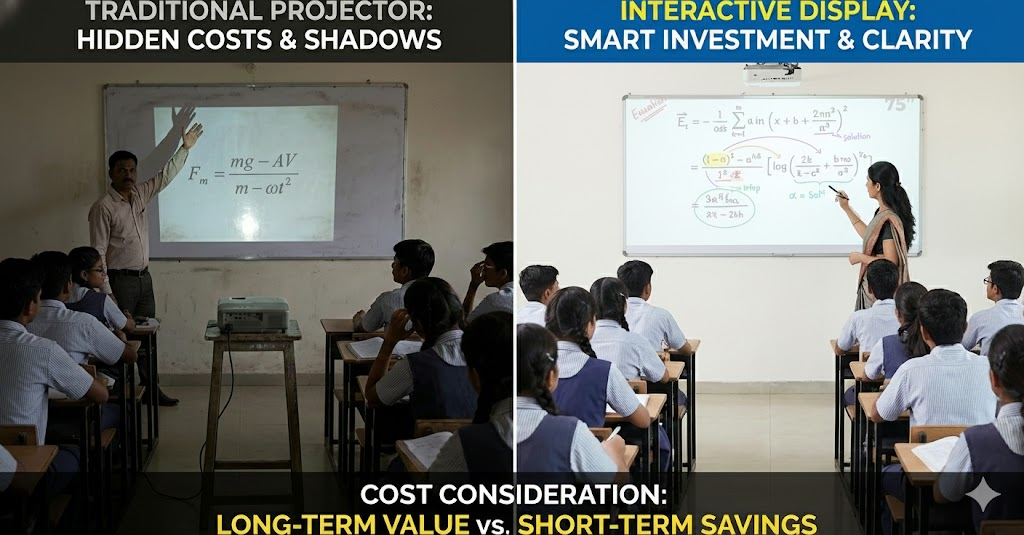
Many coaching centers still use traditional projectors because the upfront spend looks smaller. But the long-term picture looks very different.
Why projectors often cost more over time:
- Repeated bulb replacements
- Lower clarity in bright rooms
- Shadows when teachers move
- Reduced visibility for students in the back
- Frequent maintenance interruptions
Why interactive displays are shifting the cost landscape:
- Consistent brightness
- Clear visuals in fully lit rooms
- Smooth writing experience
- Higher accuracy for science and math subjects
- Far lower long-term maintenance
This is why even budget-conscious coaching centers now consider large-format interactive displays a smarter long-term financial choice.
Final Thoughts
If your coaching center is researching smart board cost, the most reliable approach is to evaluate your needs before comparing numbers. Room depth, subject style, viewing distance, and batch size matter far more than brand brochures or marketing terms. Once you factor these in, the right display size and the right long-term investment become clear.
A well-chosen interactive display helps you teach faster, reduce misunderstandings, improve recordings, and create a more professional classroom environment. For coaching centers preparing students for competitive exams, the clarity and scale of your teaching tools can make a real difference in learning outcomes.
Upgrade Your Coaching Center with Roombr’s Smart Board Alternative
Roombr offers cutting-edge, all-in-one digital classroom devices that cater to your specific teaching needs. Whether you’re looking to enhance student engagement, improve long-distance clarity, or streamline your hybrid batches, Roombr provides top-quality smart board alternatives for teaching at competitive prices.
See how Roombr can help elevate your classroom to the next level. Contact us for a personalized consultation on smart classroom solutions that fit your coaching center’s unique requirements.

Foziya Abuwala
Share
Step Into the future of
Education with Roombr












