




For years, schools upgrading to a digital classroom have followed one familiar path: buy an interactive flat panel, insert an OPS module, install teaching apps, and hope everything works smoothly for years. It’s a setup many institutions know well, and it sits at the centre of thousands of smart classrooms across India.
But technology has moved beyond. Today, some alternatives give the same teaching experience (and often more) without relying on OPS at all. One of the strongest examples is Roombr, an all-in-one unit that brings projection, computing, interaction, recording tools, and classroom software into a single device.
This deep dive takes a close look at OPS for interactive panel setups, how they work, where they help, where they struggle, and how all-in-one systems approach the same goal with a very different architecture. By the end, educators and decision makers will have a clearer picture of which direction fits their school’s needs best.
OPS for Interactive Panel vs All-In-One Device: Why This Debate Matters for Schools Today
Schools are facing new pressures. Students want richer content. Teachers need better tools. Administrators need technology that lasts. IT teams are expected to support dozens of rooms with limited staff.
In this environment, the choice between:
- an interactive flat panel with an OPS module, or
- an all-in-one alternative like Roombr
…is not just about hardware. It’s about how teaching feels every day, how fast classrooms run, how much maintenance teams must handle, and how reliably the system performs three to five years from now.
What OPS for Interactive Panel Actually Is
OPS stands for Open Pluggable Specification, introduced by Intel to make it easier to slot a computer into a display. When you see an interactive panel board in a classroom, the OPS is usually the small rectangular “PC” plugged into its side or back.
Inside an OPS unit, you’ll typically find:
- a laptop-class processor (often i3, i5, or i7)
- 4–8GB RAM
- SSD storage
- integrated graphics
- Windows installed by the panel vendor
When installed, the module makes the interactive flat panel display behave like a giant touchscreen computer. Everything runs from this small module.
Where OPS for interactive panel helps:
- Reduces cable clutter
- Removes the need for an external CPU
- Gives schools a simple upgrade path (swap the module)
Where OPS for interactive panel strains:
- Thermal limits because of the small enclosure
- Processing power that dips under heavy loads
- Performance is tied to each display vendor’s firmware
- Inconsistent reliability across brands
- Higher replacement cost if the unit fails
These strengths and limits matter because a classroom is a demanding environment. Teachers switch tasks quickly. The screen plays all day. The panel sits in a room that may not always be air-conditioned. This is where many OPS modules start slowing down after 18–24 months.
How an OPS-Powered Interactive Flat Panel Works Internally
To understand the difference between OPS and all-in-one alternatives, it helps to break down the internal path of an OPS system:
- The interactive panel boots its firmware.
- The OPS module boots Windows.
- The panel’s touch sensors send data to the OPS via an internal connection.
- The OPS sends video output back to the panel.
- Teachers run apps, media, and tools on the OPS.
This loop introduces a few technical constraints:
Thermal Envelope
Because the OPS sits inside the panel’s chassis, airflow is limited. The module heats up, the panel heats up, and the CPU often throttles.
Shared Power
OPS modules draw power from the display, which can slow boot times and introduce strain during heavy tasks like video playback or recording.
I/O Limitations
The number of USB ports, HDMI ports, and audio connections varies by brand. Not all OPS-ready panels provide enough connectivity for schools that record classes or use document cameras.
Vendor Dependency
Drivers and updates come through the panel manufacturer. If support slows, the OPS starts feeling outdated long before the panel itself wears out.
All these factors make OPS for interactive panel workable but sometimes fragile in real classrooms.
What “All-in-One Alternatives” Really Mean
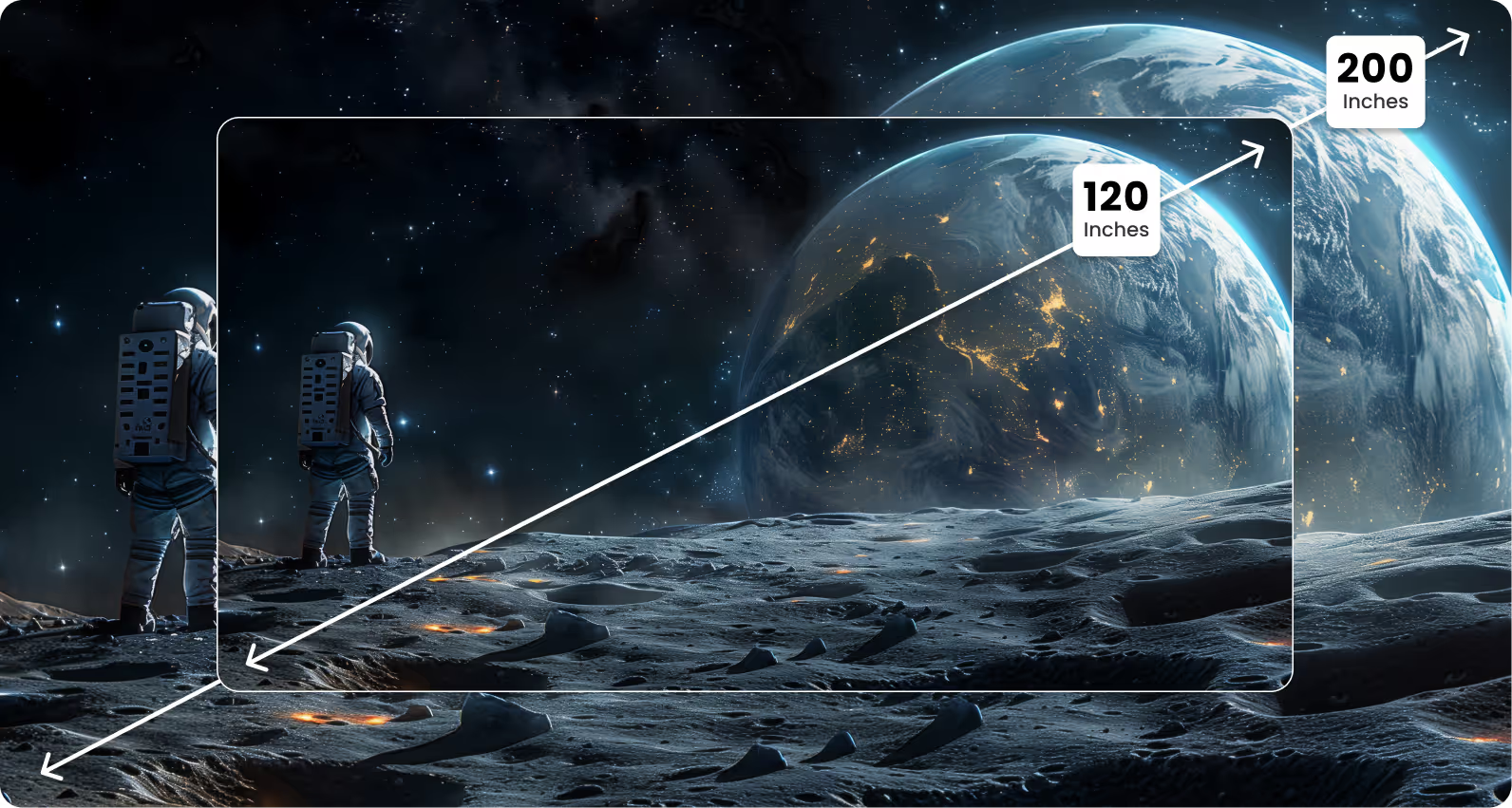
Roombr doesn’t rely on OPS for computing or an interactive flat panel for display. Instead, it takes a different architecture:
- A projection-based interactive display solution that scales from 120 to 200 inches
- A powerful onboard computer (i5/i7, Windows 11, UHD graphics)
- Dual cameras
- Strong audio system
- Sensitive microphones
- Full interaction system with IR touch
- Classroom recording and editing tools
- Integrated teaching platform
- Plug-and-play installation
Instead of inserting a small computer into a large display, Roombr combines everything into a single device that replaces the panel itself.
This shifts where the “brain” of the classroom lives. Instead of being trapped inside the panel, the computing hardware stands separate and well-cooled, allowing stronger performance and simpler servicing.
The Technical Architecture of Roombr
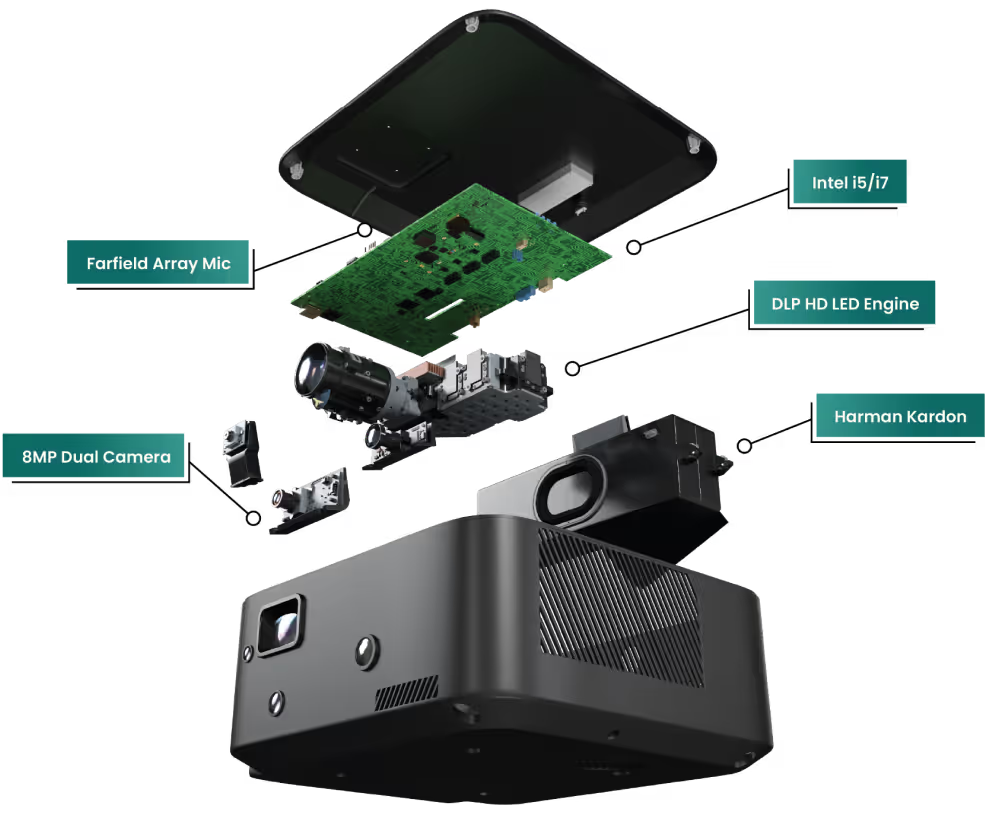
Roombr brings a full hardware stack that gives schools a large interactive teaching space without needing a panel. Here’s how it works at a system level:
Display and Interaction
- DLP projection technology
- 1080p resolution
- 1500 ANSI lumens brightness
- 120–200 inch interactive display size
- Multi-touch IR-based tracking
- 3D capabilities
This gives teachers far more interactive screen size than a standard 65–75 inch panel, and the interactive space becomes a wall-wide canvas for teaching.
Computing Hardware
- Windows 11
- Intel i5/i7 processors
- Intel UHD Graphics 630
- 16GB RAM
- 1TB SSD
These are desktop-grade specifications, not thermally restricted laptop-grade processors found in most OPS units.
Audio + Microphone System
- 20W Harman speakers
- High-sensitivity MEMS microphones with noise cancellation
- Four-channel RF microphone system
This allows clear lecture capture, hybrid teaching, and student questions without additional equipment.
Camera System
- Dual 8MP front and rear cameras
- 110° wide-angle
- HD recording
Teachers can record both board work and themselves with clean switching and sharp output.
Connectivity
- 2 HDMI in, 1 HDMI out
- USB 3.0 ports
- Ethernet
- Wi-Fi and Bluetooth
- 4G LTE SIM module
This makes Roombr usable even in campuses without stable wired networks.
Power and Efficiency
- 150W power consumption
- BIS certified
- Runs between 10°–45° Celsius
All components are engineered for Indian classroom conditions where heat, dust, and long teaching hours are common.
This difference in architecture sets the stage for a direct comparison.
OPS for Interactive Panel vs All-in-One Alternatives: What Teachers Experience Daily
Boot Time
- OPS modules often take 45–90 seconds, depending on age.
- Roombr boots fast because the computing hardware is independent, efficient, and optimised for daily classroom use.
Switching Between Apps
OPS devices sometimes lag as the CPU heats up. Roombr handles multitasking well due to better cooling and a desktop-grade processor.
Writing and Interaction
Both systems provide touch, but Roombr offers a much larger surface. Teachers can write, annotate, draw, and display content on a 120–200 inch wall, giving a more natural teaching feel.
Audio and Video
OPS setups often need external speakers or cameras. Roombr has everything built in and tuned for teaching environments.
Recording a Class
Most OPS modules don’t support high-quality recording without expansion hardware. Roombr records in HD by default, with:
- dual camera views
- noise-reduced audio
- AI-enabled editing tools
- shareable sessions
- archiving options
This alone changes how teachers handle revision, remedial learning, and asynchronous classes.
How IT Teams See the Difference
Installation
OPS-based panels are heavy, require wall mounts, and often involve two teams (vendor + IT). Roombr is plug-and-play. Mount, connect the power, and switch on.
Compatibility
Every OPS is tied to its panel brand. If the panel ages, breaks, or firmware changes, the OPS may not work with the next unit. Roombr is independent. You don’t replace panels; you replace the unit if needed.
Servicing
OPS replacements are pricey, and the panel must be opened. Roombr’s servicing is straightforward because the computer and display system sit outside a sealed panel.
Updates and Support
OPS updates rely on panel brands. Roombr controls the full stack including hardware, software, firmware which makes support cleaner.
Real-World Performance: OPS for Interactive Panel vs Roombr
Processing power
OPS modules run laptop-class CPUs in a tight shell. After extended use, throttling is common. Roombr runs full desktop-grade processors with proper cooling.
Heat and Stability
OPS units sit inside a warm display. Roombr dissipates heat efficiently, so performance stays steady through long sessions.
Touch Latency
OPS touch accuracy depends on the panel brand. Roombr uses IR touch tracking across a much larger surface, giving teachers more space to interact and move.
Multimedia Playback
OPS modules handle basic tasks well, but heavy media or recording pushes them hard. Roombr is built for repeated video playback, recording, streaming, and teaching apps all at once.
Total Cost of Ownership Over Five Years
OPS-based Setup
- Panel + OPS module
- Higher maintenance
- Possible OPS replacements
- Expensive panel repairs
- Increased downtime
Interactive flat panel displays also become outdated quickly as new models arrive, making replacements costly.
Roombr Setup
- One unit handles everything
- No dependency on panel brands
- Lower service cost
- Easier upgrade path
- Works even if classrooms shift or get repurposed
Schools that plan a multi-room upgrade often find this approach more predictable and easier to scale.
Common Problems Schools Report With OPS Systems
- Slow boot after a year or two
- Interactive Panel-OPS compatibility issues
- Lack of uniform performance across rooms
- Overheating in non-AC classrooms
- Dead OPS modules requiring costly swaps
- Recording tools that lag or fail
- Touch inconsistencies across brands
These issues don’t appear everywhere, but they’re common enough to matter when planning 20, 40, or 100 classrooms.
When OPS Still Makes Sense
It’s fair to say that OPS isn’t obsolete. It still suits:
- Schools that already invested in interactive flat panels
- Labs that need Windows-only apps
- Institutions with stable AC environments
- Rooms where recording isn’t a priority
If a panel needs a computer inside it, OPS is still the convenient choice.
When All-in-One Alternatives Like Roombr Fit Better
Roombr becomes the stronger choice in situations where schools want:
- Larger interactive surfaces (up to 200 inches)
- Dual-camera recording
- Hybrid and remote teaching
- Simple servicing
- Faster performance
- Plug-and-play deployment
- A system that isn’t tied to panel brands
- A platform that supports both live and recorded learning
Roombr doesn’t just replace the panel; it rethinks how the entire classroom works.
Teachers get tools for:
- Live Instruction
- Recording
- Editing
- Sharing
- Archiving
- Assessments
- Collaboration
Students get content they can revisit, review, and practice with anytime.
Roombr Digital Classroom Technology in Practice
Roombr’s patented approach brings together:
- A Large Interactive Wall
- Integrated Computing
- A Recording Engine
- A Collaborative Whiteboard
- Tests And Assignments
- Student Progress Tracking
- Shareable Classes
- Ai-Driven Editing
This combination means teaching happens smoothly whether students are in the room, watching later, or joining remotely. The platform allows back-and-forth collaboration that goes past live classes. Sessions can be reopened, improved, and enhanced over time.
Where OPS systems give you a touchscreen computer, Roombr gives you a holistic teaching environment built for both synchronous and asynchronous learning.
Final Thoughts: Two Approaches, One Goal
Both OPS systems and all-in-one alternatives aim to support better teaching. They simply take different routes to get there.
- OPS for interactive panel setups work well when you want an integrated screen and don’t need advanced features.
- Roombr works best when schools need a larger display, stronger computing power, built-in recording, dual cameras, AI-enabled editing, and cleaner servicing.
In a world where teaching now happens in person, online, and later through recorded content, Roombr offers a complete ecosystem that adapts to each mode.
If your school or college is planning a long-term upgrade, it’s worth looking at which approach gives teachers more room to teach and students more ways to learn.
Upgrade Your Digital Classroom With a Smarter Alternative
If your school is weighing an interactive flat panel or an interactive smart board, it’s time to look at a solution built for today’s teaching needs. Roombr gives you a larger interactive display solution, stronger performance, built-in recording, and a simple plug-and-play setup without the limits of an OPS for an interactive panel system. It turns any wall into a powerful teaching surface and helps teachers deliver classes that students can replay, revise, and learn from anytime.
Give your classrooms a tool that supports real teaching, reduces maintenance, and grows with your institution.
Book a free Roombr demo and see how one device can transform every lesson.

Foziya Abuwala
Share
Step Into the future of
Education with Roombr












